
Built Around Input Safety
Important InfoHardware + Software System
Uses a physical USB device recognized as a standard keyboard so game input appears human-like.
No Client Tampering
No memory reads, no DLL injection, no packet manipulation, no game file modification.
Configurable Per Class and Map
Scripts and profiles are not plug-and-play; examples are provided and easy to adapt.
Alert-Oriented Design
Multiple safety alerts, player detection, and whiteroom detection are built in.
Indirect Capture
Does not directly touch the game window.
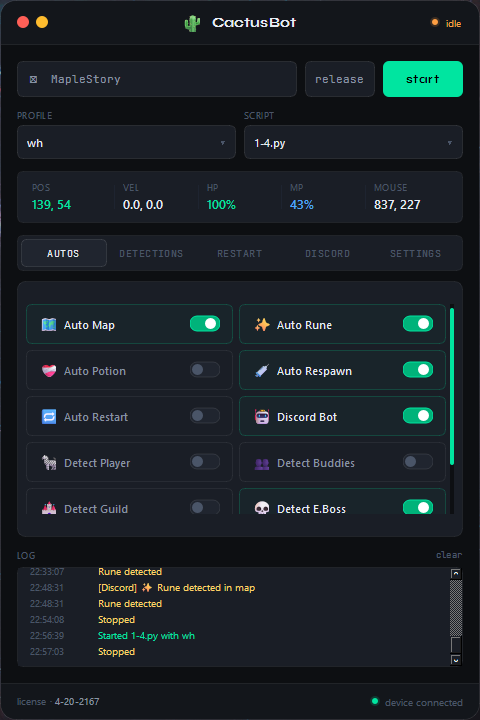
Core Features
14 capabilitiesAll Resolutions
Runs across all game resolutions in windowed mode.
Rune Solving
Automated rune solving during gameplay loops.
Auto Respawn
Automatically returns to your grind flow after death.
EBoss Detection
Detects elite boss events with custom response behavior.
Mouse Automation
Supports mouse input automation alongside keyboard logic.
Scheduler & Profiles
Per-map scripts, character profiles, randomized delays, command scheduling.
Player Detection
Detects nearby players and triggers configurable safety responses.
Whiteroom Detection
Kills scripts instantly when a GM teleports you to a whiteroom.
Pathfinding
Traverse most maps with coordinate-aware movement logic.
Custom Detection Logic
Each trigger can run its own unique response logic.
Routine Builder
Build and chain automated routines for repeatable daily tasks.
Instant Kill Switch
Immediately halts all bot activity with a single trigger.
Private Server Support
Compatible with private server environments.
Two-PC Setup
Keep bot software off your game PC entirely — possible, not required.
Discord Remote Control
7 capabilitiesChat Passthrough
Read MapleStory chat in Discord and reply back to the game.
Scheduled Actions
Schedule starts, stops, and teleports from Discord.
Remote Teleport
Remotely teleport your character when needed.
Script Control
Start and stop scripts without touching the client PC.
Live Status
Request current runtime status at any time.
Remote Screenshot
Capture and retrieve game screenshots via Discord.
Private Bot
Operate through a private channel for tighter access control.
QoL Tools
8 utilitiesAI Scripting
Pre-built AI context and prompts to generate or improve scripts fast.
VS Code Extension
Streamlined script editing directly in VS Code.
Delay Finder
Tune timing windows to keep rotations reliable and natural.
Profile Generator
Generate baseline profiles so class setup starts from a solid template.
Input Recorder
Record your inputs and replay them perfectly.
Routine Builder
Interactively create scripts without writing each line manually.
Auto Cuber
Automated cubing workflow for streamlined gear rolling.
Familiar Cuber
Quality rolling and familiar management improvements.
Coming Next
In pipelineMapleStory Classic
A classic-focused version tuned for old-school MapleStory.
Pricing
Simple two-partPhysical USB device recognized as a standard keyboard. Includes US shipping. International shipping calculated per case.
Activate only when you need it, directly from the application. No annual subscription required.
FAQ
Common questionsWhat are the PC requirements?
Cactus Bot is designed to be as lightweight as possible. A fairly modern CPU is recommended. The computer vision calculations require some CPU overhead — if your usage is under 50% while running MapleStory you should be fine.
How hard is writing scripts?
Scripts are approachable. Example scripts are included so you can adapt fast. You can also feed them to an AI to generate new ones quickly.
Why should I choose Cactus Bot?
Cactus Bot is built around flexibility, safety, and practical features. It handles simple and highly complex setups equally well — it is not a plug-and-play solution, and that's intentional.
Bot Updates
All future updates are available to you, including any variant versions such as MapleStory Classic.
What support is included?
Technical issue support is available through tickets on Discord. Scripting help may be available depending on availability.
Do I have to use the USB?
Yes. The USB is a core part of the bot's safety design. Without it, input injection is easily detectable and may result in bans without notice.
Risk & Usage
DisclaimerNo Refunds
Purchases are final. Please evaluate requirements before buying.
Do Not Bot Unattended
Stay nearby so you can intervene quickly when alerts trigger.
Hardware Lead Time
USB inventory is limited — lead times can extend by a few weeks.
Need Help or Have a Suggestion?
Technical support via Discord tickets. For payment issues, keep your NOWPayments order ID on hand.